
LabelLens: document OCR & schema-driven AI Agent
Turn any document photo into structured data your systems can use.
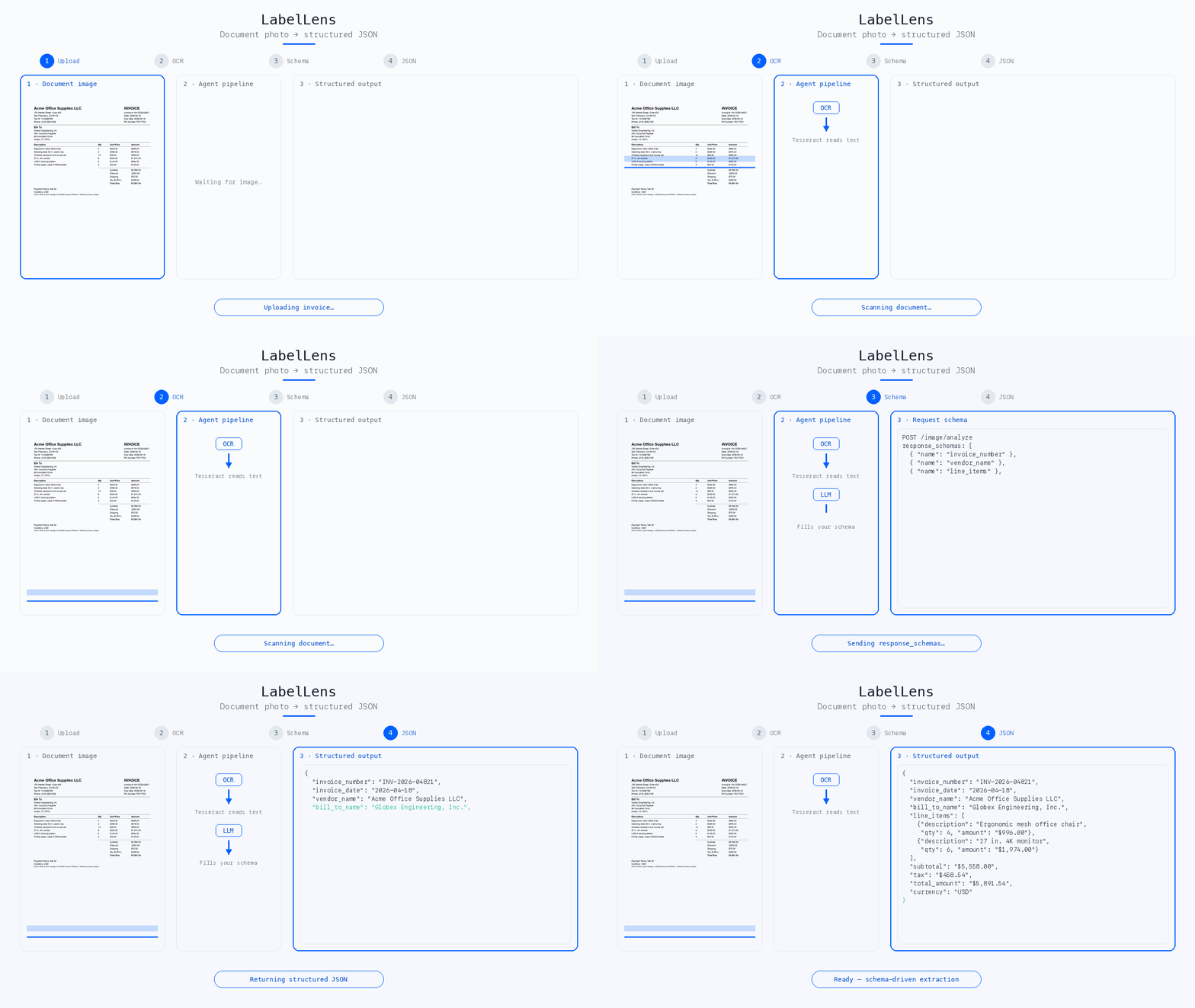
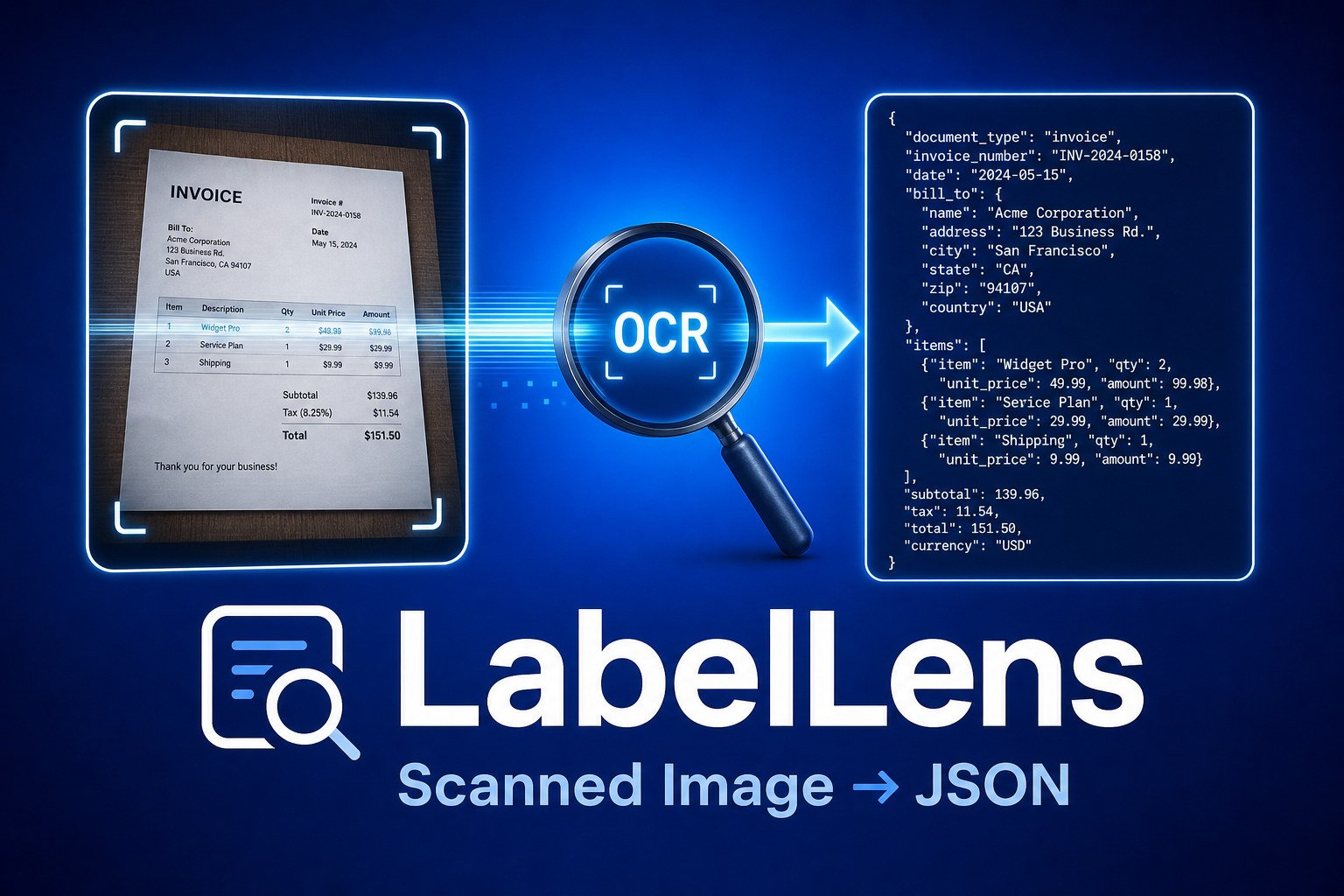
LabelLens is an AI agent as an HTTP API: snap a picture of a document, a label, invoice, receipt, expense report, shipping form, ID card, send it with a simple JSON “wish list” of fields, and get back consistent, machine-readable JSON. No free-form paragraphs to parse, no separate model per document type.
Why document extraction APIs matter
response_schemas), same service, every document typeLLM_BASE_URL at compatible endpoints (Azure, proxies, self-hosted) when neededHow LabelLens works (in four steps)
- Upload a document image (photo or scan) to the API.
- OCR reads the text, Tesseract by default (no Google account required), or Google Cloud Vision when you need higher accuracy on hard photos.
- You send
response_schemas: a JSON description of the fields you want (names, descriptions, types, e.g.invoice_number,total_amount,line_items). - The agent fills those fields from the OCR text and returns JSON whose keys match your schema.
The agent reasons over extracted text, not raw pixels, so clear photos and readable print matter. Poor OCR fails fast with a helpful hint, before any LLM cost.
Where LabelLens runs
Deploy anywhere your stack lives.
| Environment | Role |
|---|---|
| Local / dev | Run with Python + pip install, or Docker, ideal for prototyping and integration tests |
| Docker | Single image with Tesseract bundled; pass -p 8080:8080 and your OPENAI_API_KEY |
| Google Cloud Run | Stateless HTTP service; scale to zero, secrets via Secret Manager; see the project README |
| Private cloud / VPC | Same container or gunicorn; keep keys and traffic inside your network |
| Behind your gateway | Put LabelLens behind API Gateway, Kong, Apigee, or your BFF, expose only /image/analyze and /health |
Default listen port is 8080 (configurable via PORT), aligned with common platform conventions (e.g. Cloud Run).
Document extraction use cases
These are patterns, not limits, you combine HTTP + JSON schema per document type.
By industry / workflow
- Finance & accounts payable, Invoice ingestion: vendor, invoice number, line items, totals, tax, due date. Drop the JSON straight into your AP system.
- Expense management, Receipt capture from employees: merchant, date, items, tax, tip, total, payment method, category guess. Feed it to your expense workflow.
- Retail & logistics, Shipping labels, waybills, SKUs, quantities, handling symbols for receiving and WMS integration.
- Food & beverage, Ingredients, allergens, nutrition facts, brand/SKU, country of origin for compliance and catalog enrichment.
- Pharma & healthcare, Medication names, strengths, NDC or lot/expiry where visible (always validate against regulated sources in production).
- Construction & field service, Drawing numbers, revision labels, safety/warning text, work order forms for traceability and audits.
- HR / onboarding, ID cards, certificates, forms, extract the printed fields without manual transcription.
- Regulatory & QA, Compare extracted document text to expected templates; flag discrepancies in downstream systems.
- Research & field teams, Capture document data offline; sync structured JSON to CRM, LIMS, or spreadsheets via your own glue code.
By integration style
| Direct API | Mobile or web app posts multipart/form-data with file + response_schemas; consumes JSON directly. |
|---|---|
| Microservice | LabelLens as a dedicated “document extraction” service; other services call it over HTTP inside the cluster. |
| Batch / ETL | Job runner feeds images from storage (S3, GCS); writes JSON to warehouse or queue for downstream ML or rules engines. |
| iPaaS / automation | Zapier, Make, or custom workers call the REST endpoint when a new image appears in email or cloud storage. |
| Document pipelines | Combine with existing OCR or routing, the core value is schema-driven structured extraction from text. |
By customization level
- Schema-driven, Change
response_schemasper document type or tenant; the built-in prompt handles extraction. - Model routing, Tune
LLM_MODEL, temperature, timeouts; useLLM_BASE_URLfor Azure OpenAI–compatible or self-hosted gateways.
We don’t sell a black-box document SKU, we sell your fields, from your images, on your infrastructure.
REST + JSON schema + Docker; OpenAI-compatible LLM; optional Google Vision for OCR.
Run in your VPC or Cloud Run; keys via env/secrets; no requirement to send images to third parties beyond your chosen LLM and optional Vision provider.